PESCO Online Bill Check 2026 – Print Your Electricity Bill

You came here because you didn’t get your PESCO bill this month — or maybe the due date is close and you just want to confirm the amount before paying. Totally fair. It happens to thousands of PESCO consumers every single month.

Here’s the good news: checking your PESCO electricity bill online takes less than a minute. You don’t need to visit any office, call anyone, or wait around. Just your reference number and a phone or laptop is all you need.

This guide covers everything — from checking your PESCO online bill to paying it, understanding its charges, checking by CNIC, and even applying for a new connection. I’ve tried to keep it simple and practical, the way I’d explain it to a friend.

PESCO Online Bill Check 2026

Check your PESCO electricity bill online. This website helps users quickly access their electricity bills online. When you enter your reference number, you are securely redirected to the official billing source. We do not store your bill information.

0/14

Find your reference number on your electricity bill or meter

PESCO Bill Calculator

Enter your consumed units to estimate your PESCO electricity bill based on NEPRA 2025 tariff rates.

Where to Find Your Reference Number?

Your 14-digit reference number is usually printed at the top section of your electricity bill, as highlighted in the image below.

Look for the area labeled “Reference Number” and enter the digits exactly as shown on your bill to check your latest electricity bill online.
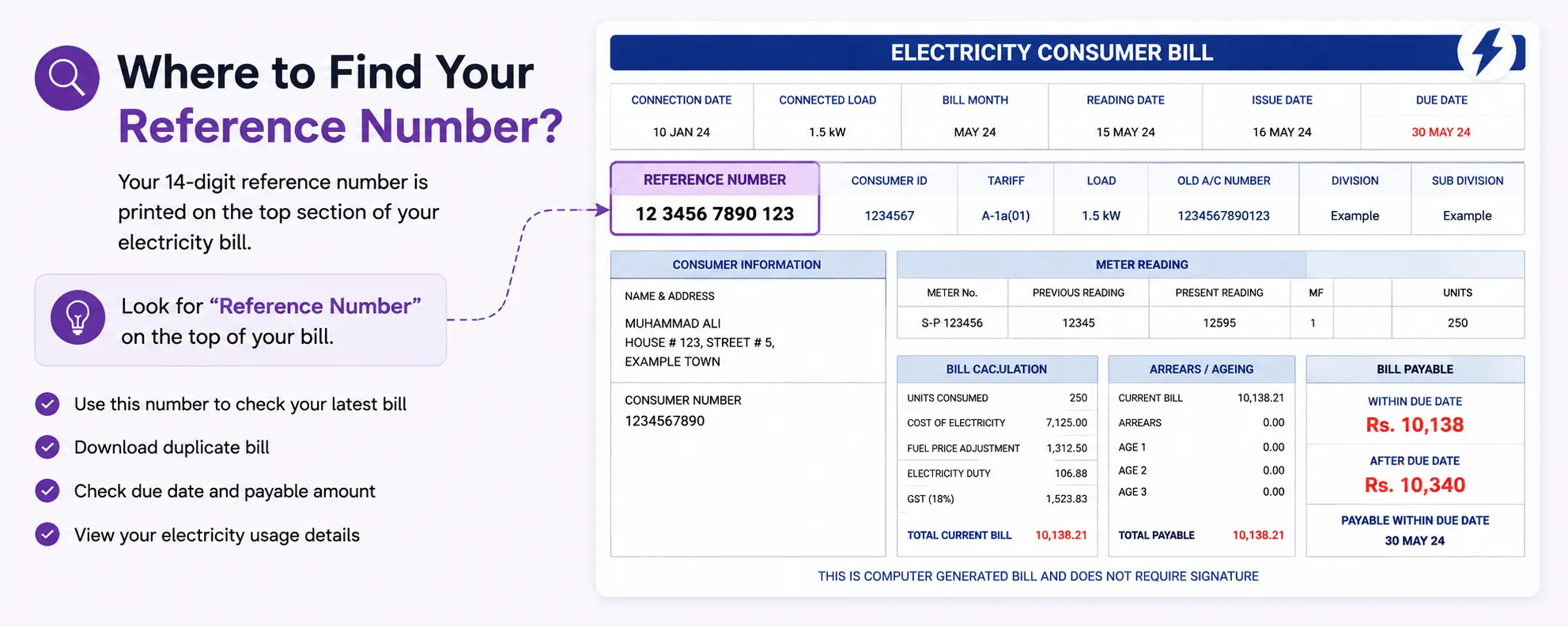
Where to Find Reference Number

You can use this number to:

  • View your latest bill
  • Download duplicate bill copy
  • Check due date and payable amount
  • Access your bill details online

Important: Enter the reference number carefully without spaces or missing digits.

Pakistan Electricity Unit Rates & Billing Guide

Pakistan Electricity Unit Rates & Billing Guide

Pakistan electricity bills are calculated according to monthly power consumption and the applicable tariff slab for each consumer category. The unit rate may vary based on the number of units used, with different pricing structures for residential, commercial, and industrial users. Final electricity costs can also be influenced by fuel price adjustments, taxes, and updates introduced under current energy regulations..

Residential Electricity Tariff Slabs

Units Consumed Category Approx Unit Price (PKR)
0-100 units Protected 10.50
101-200 units Protected 13.50
201-300 units Non-Protected 34.00
301-400 units Non-Protected 39.00
Above 400 units Non-Protected 42.00

Note: Actual electricity unit prices in Pakistan may vary by distribution company and are subject to government updates. Check with your local DISCO for current rates.

Additional Charges in Electricity Bills

Fuel Price Adjustment (FPA)

An additional charge to cover fluctuations in fuel costs used for electricity generation. This is calculated per unit consumed.

Taxes and Duties

Includes General Sales Tax (GST) at 18% on the total bill amount and electricity duty at 1.5% on energy charges.

TV Fee

A fixed monthly fee of PKR 35 for Pakistan Television (PTV) license, added to all electricity bills regardless of TV ownership.

Meter Rent

A monthly charge for meter maintenance and reading services, typically ranging from PKR 50-200 depending on meter type.

GST (18%)

General Sales Tax applied to the subtotal including energy charges, adjustments, and other fees before final taxes.

Electricity Duty

A government levy of 1.5% on energy charges to support various development programs and infrastructure.

Example Bill Calculation (250 Units)

Step 1: Units Consumed250 units consumed in a month
Step 2: Apply Tariff Slab100 units x PKR 10.50 + 100 units x PKR 13.50 + 50 units x PKR 34.00 = PKR 3,950 energy charges
Step 3: Add Additional ChargesFPA: 250 x PKR 2.35 = PKR 587.50, QTA: 250 x PKR 0.55 = PKR 137.50, GST: 18%, TV Fee: PKR 35
Step 4: Estimated Final BillTotal estimated bill: Approximately PKR 5,500 (including all charges and taxes)

Electricity Saving Tips

1
Use Energy-Efficient Appliances

Switch to appliances with high energy star ratings and efficient motors to reduce electricity consumption.

2
Turn Off Unused Devices

Unplug electronics and appliances when not in use to avoid standby power consumption, also known as vampire power.

3
Switch to LED Bulbs

Replace incandescent bulbs with LED lights which use 75% less energy and last much longer.

4
Limit Air Conditioner Usage

Set AC temperature to 24C, use ceiling fans, and maintain proper insulation to reduce cooling costs.

5
Consider Solar Energy

Install solar panels or use solar-powered devices where possible to generate your own clean electricity.

PESCO Online Bill Payment

You don’t need to stand in a queue at a bank anymore. Pakistan’s digital payment ecosystem has come a long way, and PESCO bills can now be paid through multiple channels easily.

Mobile Banking Apps

Almost every major bank in Pakistan now supports PESCO bill payment through their mobile app. Here’s how it generally works:

  1. Open your bank’s mobile app (HBL Mobile, Meezan Bank App, UBL Digital, MCB, etc.)
  2. Go to “Bill Payments” or “Utility Bills”
  3. Select Electricity → then choose PESCO
  4. Enter your 14-digit reference number
  5. The app will show your bill amount
  6. Confirm and pay — done

Banks that support PESCO bill payment include HBL, UBL, Meezan Bank, MCB, Bank Alfalah, Habib Metro, and most others.

JazzCash

If you use JazzCash, paying your PESCO bill is super straightforward:

  • Open JazzCash app
  • Tap “Pay Bills”
  • Select Electricity → PESCO
  • Enter your reference number
  • Confirm payment

Easypaisa

Same process on Easypaisa:

  • Open the Easypaisa app
  • Go to “Bill Payment”
  • Choose Electricity → PESCO
  • Enter the reference number and pay

ATMs (All Major Banks)

You can walk up to almost any OneLink-connected ATM and pay your PESCO bill without internet:

  1. Insert your debit card
  2. Select “Bill Payment”
  3. Choose Electricity → PESCO
  4. Enter your reference number
  5. Confirm amount and pay

Internet Banking

Most bank websites also offer utility bill payments through their internet banking portals. Log in, go to bill payments, select PESCO, and enter your reference number.

PESCO Bill Check By CNIC

This is one of the most frequently searched questions — and honestly, people are often disappointed by the answer.

Currently, PESCO does not officially support bill checking by CNIC number directly online. The standard online system requires either your 14-digit reference number or your 10-digit consumer ID.

So if someone told you that you can check your PESCO bill just by typing your CNIC into a website — that’s not accurate for the official system.

PESCO Online Bill Check by Name

Same situation here. PESCO’s online portal does not allow consumers to search by name. The system is reference-number based.

Why? Because there can be thousands of people with the same name registered across KPK. A name search without further verification would create serious privacy issues.

The practical workaround:

If you genuinely don’t have your reference number:

  • Check any old PESCO bill you may have received at home
  • Ask your landlord if you’re a tenant — they should have it
  • Call PESCO helpline 118 with your address and CNIC for assistance
  • Visit the nearest PESCO office and request your consumer details

Once you have your reference number, checking your PESCO web bill online takes just seconds.

PESCO Old Bill History Check

Want to check what your PESCO bill was last month? Or three months ago? Good news — PESCO’s bill system does show a payment history.

When you generate your current PESCO duplicate bill online:

  1. Open the full bill view
  2. Scroll down to the “Bill Payment History” section
  3. You’ll see the last 12 months of billing and payment records

This includes how much was billed, what was paid, and when. It’s really useful if you’re tracking your consumption trends or checking whether a previous month’s bill was actually paid.

Important: You can only check payment status for recent bills this way. For very old bills (more than 12 months), you’d need to contact PESCO’s office directly as the online portal doesn’t go further back.

Apply for New PESCO Connection Online (Meter Installation)

Getting a new PESCO electricity connection has become easier compared to a few years ago. You can now initiate the process online.

How to Apply for a New PESCO Meter Connection

  1. Visit the official PESCO website: www.pesco.org.pk
  2. Look for the “New Connection” or “Consumer Services” section
  3. Fill in your application with:
    • Your CNIC
    • Property address and ownership details
    • Load requirement (in kW)
    • Type of connection (Domestic / Commercial / Industrial)
  4. Submit the application and note your application reference number
  5. A PESCO representative will visit your premises for a site survey

Documents Usually Required

  • Copy of CNIC
  • Proof of property ownership (registry / tenancy agreement)
  • No-Objection Certificate (NOC) from building owner if renting
  • Layout/site plan (for commercial connections) PESCO Complaint & Helpline Number
  • Got a problem with your PESCO bill or electricity supply? Here’s how to reach out.

PESCO Complaint & Helpline Number

Got a problem with your PESCO bill or electricity supply? Here’s how to reach out.

PESCO Helpline

  • Helpline Number: 118 (toll-free, 24/7)
  • Alternative: 091-9213601 (Peshawar head office)
PESCO Bill FAQs

PESCO Online Bill Check FAQs

Can I check PESCO bill without a reference number?

Not directly online. You’ll need to contact PESCO helpline

How early does PESCO bill appear online?

Typically within 1-3 days of meter reading. You can check regularly using your reference number

Is checking PESCO bill online free?

Is checking PESCO bill online free?

What happens if I pay after the due date?

A late payment surcharge is added — the exact amount is mentioned on your bill under “Amount after due date.”

What is a PESCO detection bill?

A detection bill is issued when illegal use of electricity is found — such as meter tampering.

Need help? Contact PESCO support or call 118 (WAPDA Helpline)