LESCO Bill Online Check 2026 – Check Duplicate Bill by Reference Number

Electricity bills can become stressful when the original copy gets lost or the due date is getting close. I’ve noticed many people in Lahore and nearby areas search for their bill at the last minute, especially when they need a duplicate copy for payment.

The good thing is that checking your LESCO bill online is now much easier than before. You can view your latest electricity bill, download a duplicate copy, print it, and even pay it online without visiting any office.

This guide explains everything in simple words — from finding your reference number to understanding tariffs, complaint methods, payment options, and common billing issues.

LESCO Online Bill Check 2026

Check your LESCO electricity bill online. This website helps users quickly access their electricity bills online. When you enter your reference number, you are securely redirected to the official billing source. We do not store your bill information.

0/14

Find your reference number on your electricity bill or meter

LESCO Bill Calculator

Enter your consumed units to estimate your LESCO electricity bill based on NEPRA 2025 tariff rates.

How to Check LESCO Bill Online

You can check your bill in less than a minute if you have either:

  • Reference Number
  • Customer ID

Both numbers are printed on your previous electricity bill.

Where to Find Your Reference Number?

Your 14-digit reference number is usually printed at the top section of your electricity bill, as highlighted in the image below.

Look for the area labeled “Reference Number” and enter the digits exactly as shown on your bill to check your latest electricity bill online.
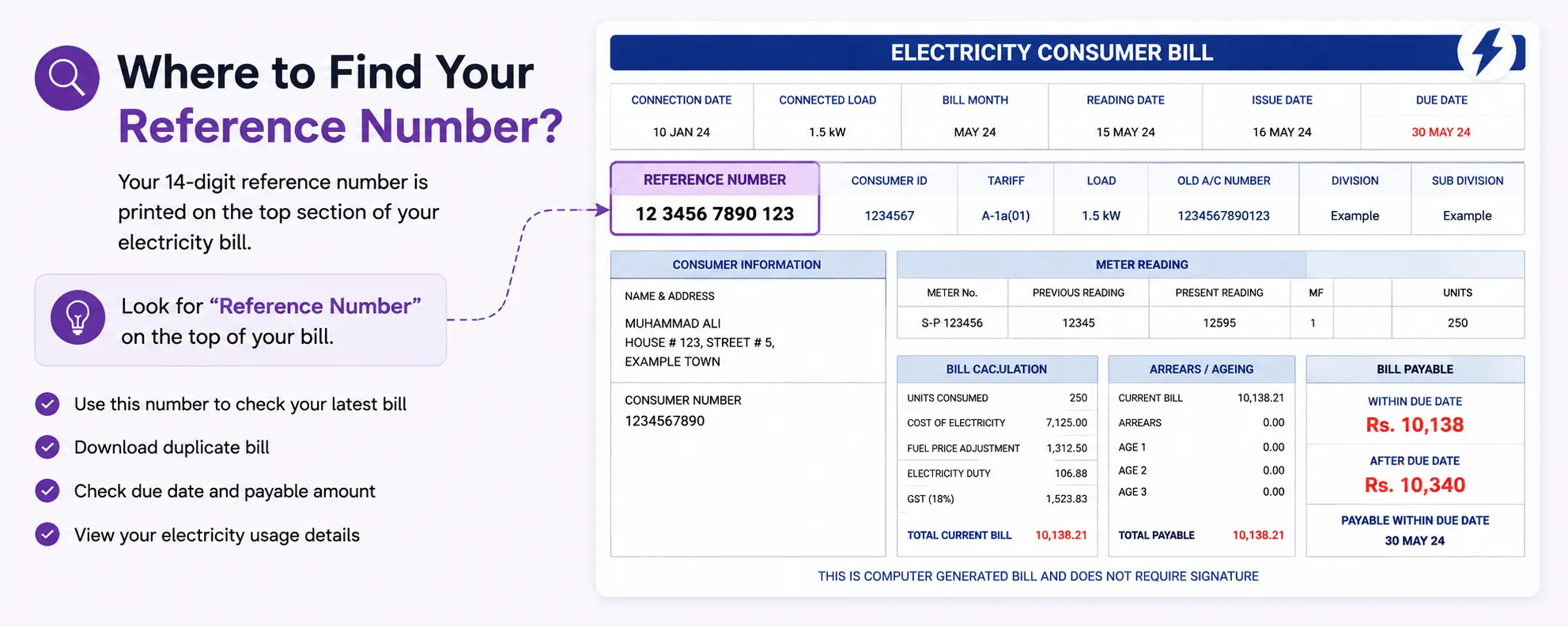
Where to Find Reference Number

You can use this number to:

  • View your latest bill
  • Download duplicate bill copy
  • Check due date and payable amount
  • Access your bill details online

Important: Enter the reference number carefully without spaces or missing digits.

Method 2: Check LESCO Bill by Customer ID

LESCO also allows users to search bills through Customer ID.

Here’s how:

RequirementDetails
Customer IDPrinted on previous bill
Internet AccessMobile or desktop
PurposeBill checking & duplicate copy

This method is useful if your reference number is unclear or damaged.

Can You Check LESCO Bill by CNIC?

At the moment, LESCO bills are generally not searchable directly through CNIC on official systems.

You’ll still need:

  • Reference Number
  • Customer ID

If you don’t have either, you may need to:

  • Check an older bill copy
  • Contact customer support
  • Visit the nearest customer center

LESCO Duplicate Bill Download and Print Guide

Sometimes the original bill gets lost, wet, or misplaced. In that case, you can easily get a LESCO duplicate bill online.

Steps to Download LESCO Duplicate Bill

  1. Enter reference number or customer ID
  2. Open the latest bill
  3. Click download or print option
  4. Save PDF copy on your phone or computer

Many users now keep a digital bill copy to avoid future problems.

Helpful Tip

If you regularly pay online, save the PDF bill in Google Drive or WhatsApp for quick access later.

Residential Electricity Tariff Details in Pakistan

Residential Electricity Tariff Details in Pakistan

In Pakistan, electricity charges are calculated according to the number of units consumed during a billing month and the applicable tariff structure. Consumers are placed into different billing slabs, where electricity rates increase as usage rises. Separate tariff systems are used for residential, commercial, and industrial consumers, while final bill amounts may also include taxes, fuel adjustments, and other regulatory charges approved by NEPRA..

Residential Electricity Tariff Slabs

Units Consumed Category Approx Unit Price (PKR)
0-100 units Protected 10.50
101-200 units Protected 13.50
201-300 units Non-Protected 34.00
301-400 units Non-Protected 39.00
Above 400 units Non-Protected 42.00

Note: Actual electricity unit prices in Pakistan may vary by distribution company and are subject to government updates. Check with your local DISCO for current rates.

Additional Charges in Electricity Bills

Fuel Price Adjustment (FPA)

An additional charge to cover fluctuations in fuel costs used for electricity generation. This is calculated per unit consumed.

Taxes and Duties

Includes General Sales Tax (GST) at 18% on the total bill amount and electricity duty at 1.5% on energy charges.

TV Fee

A fixed monthly fee of PKR 35 for Pakistan Television (PTV) license, added to all electricity bills regardless of TV ownership.

Meter Rent

A monthly charge for meter maintenance and reading services, typically ranging from PKR 50-200 depending on meter type.

GST (18%)

General Sales Tax applied to the subtotal including energy charges, adjustments, and other fees before final taxes.

Electricity Duty

A government levy of 1.5% on energy charges to support various development programs and infrastructure.

Example Bill Calculation (250 Units)

Step 1: Units Consumed250 units consumed in a month
Step 2: Apply Tariff Slab100 units x PKR 10.50 + 100 units x PKR 13.50 + 50 units x PKR 34.00 = PKR 3,950 energy charges
Step 3: Add Additional ChargesFPA: 250 x PKR 2.35 = PKR 587.50, QTA: 250 x PKR 0.55 = PKR 137.50, GST: 18%, TV Fee: PKR 35
Step 4: Estimated Final BillTotal estimated bill: Approximately PKR 5,500 (including all charges and taxes)

Electricity Saving Tips

1
Use Energy-Efficient Appliances

Switch to appliances with high energy star ratings and efficient motors to reduce electricity consumption.

2
Turn Off Unused Devices

Unplug electronics and appliances when not in use to avoid standby power consumption, also known as vampire power.

3
Switch to LED Bulbs

Replace incandescent bulbs with LED lights which use 75% less energy and last much longer.

4
Limit Air Conditioner Usage

Set AC temperature to 24C, use ceiling fans, and maintain proper insulation to reduce cooling costs.

5
Consider Solar Energy

Install solar panels or use solar-powered devices where possible to generate your own clean electricity.

LESCO Bill Online Check Lahore – Areas Covered

LESCO mainly serves Lahore and nearby districts.

Districts Covered by LESCO

RegionCoverage
LahoreUrban & rural areas
KasurMultiple localities
SheikhupuraResidential & commercial
OkaraSelected regions
Nankana SahibElectricity distribution areas

Coverage may vary in some rural zones.

Methods to Pay LESCO Bill Online

Many people now prefer online payment because it saves time and avoids long lines.

Pay Through Easypaisa

Easypaisa is one of the easiest options.

Steps:

  1. Open Easypaisa app
  2. Select Bill Payment
  3. Choose Electricity
  4. Select LESCO
  5. Enter reference number
  6. Confirm payment

Pay Through JazzCash

JazzCash also supports LESCO bill payments.

You can pay through:

  • Mobile app
  • Retailer shop
  • JazzCash account

This method is popular among users who don’t use banking apps.

Pay Using ATM

Most Pakistani banks support LESCO payments through ATM machines.

Usually Available On:

  • HBL
  • UBL
  • Meezan Bank
  • Allied Bank
  • Bank Alfalah

Just choose:

Bill Payment → Electricity → LESCO

Then enter your reference number.

Post Office Payment

Traditional payment methods are still available.

You can pay your LESCO bill through:

  • Pakistan Post Offices
  • Designated collection centers
  • Partner banks

This option is useful in areas where internet access is limited.

What Happens If the LESCO Bill Due Date Passes?

This is something many consumers worry about.

If the due date passes:

  • Late payment surcharge may apply
  • Extra charges can increase gradually
  • Continuous non-payment may lead to disconnection

From what I’ve seen, many users mistakenly assume one or two days won’t matter. But some bills immediately include late payment charges after the due date.

So it’s better to pay early whenever possible.

LESCO Bill FAQs

LESCO Online Bill Check FAQs

How can I check my LESCO bill online?

Enter your 14-digit reference number in the bill checker above and click the button to view your latest bill.

Can I download a duplicate LESCO bill?

Yes. You can download and print a duplicate copy anytime.

Is the downloaded duplicate bill valid for payment?

Yes, duplicate bills are normally accepted everywhere for bill payment.

Can I pay LESCO bill with Easypaisa or JazzCash?

Yes, both platforms support electricity bill payments.

What if I lose my reference number?

You may find it on an older bill copy or contact customer support for assistance.

Need help? Contact LESCO support or call 118 (WAPDA Helpline)