If you’re trying to check your TESCO online bill, you’re probably looking for a quick way to see your electricity charges without waiting for the paper bill. Many users in Tribal areas face delays in receiving bills, so online checking becomes the easiest solution.
I’ve noticed a lot of people get confused with reference numbers, duplicate bills, and even where to start. Don’t worry, we’ll keep this super simple.
In this guide, I’ll walk you through how to check your TESCO bill online, understand charges, and download a duplicate bill in just a few seconds.
What is TESCO in Pakistan?
TESCO stands for Tribal Areas Electricity Supply Company. It’s one of the DISCO companies under the supervision of WAPDA and regulated by NEPRA.
TESCO Online Bill Check 2026
Check your TESCO electricity bill online. This website helps users quickly access their electricity bills online. When you enter your reference number, you are securely redirected to the official billing source. We do not store your bill information.
Enter the 14-digit reference number printed on your previous TESCO electricity bill.
Enter your consumed units to get a rough TESCO electricity bill estimate. This calculator uses general tariff assumptions, so the official bill may differ because tariffs, taxes, adjustments, fixed charges, sanctioned load and consumer category can change.
Disclaimer: This result is for general guidance only. Your official bill may differ because tariffs, FPA, quarterly adjustments, taxes, fixed charges, sanctioned load, previous balances and consumer category can change.
Where to Find Your Reference Number?
Your 14-digit reference number is usually printed at the top section of your electricity bill, as highlighted in the image below.
Look for the area labeled “Reference Number” and enter the digits exactly as shown on your bill to check your latest electricity bill online.
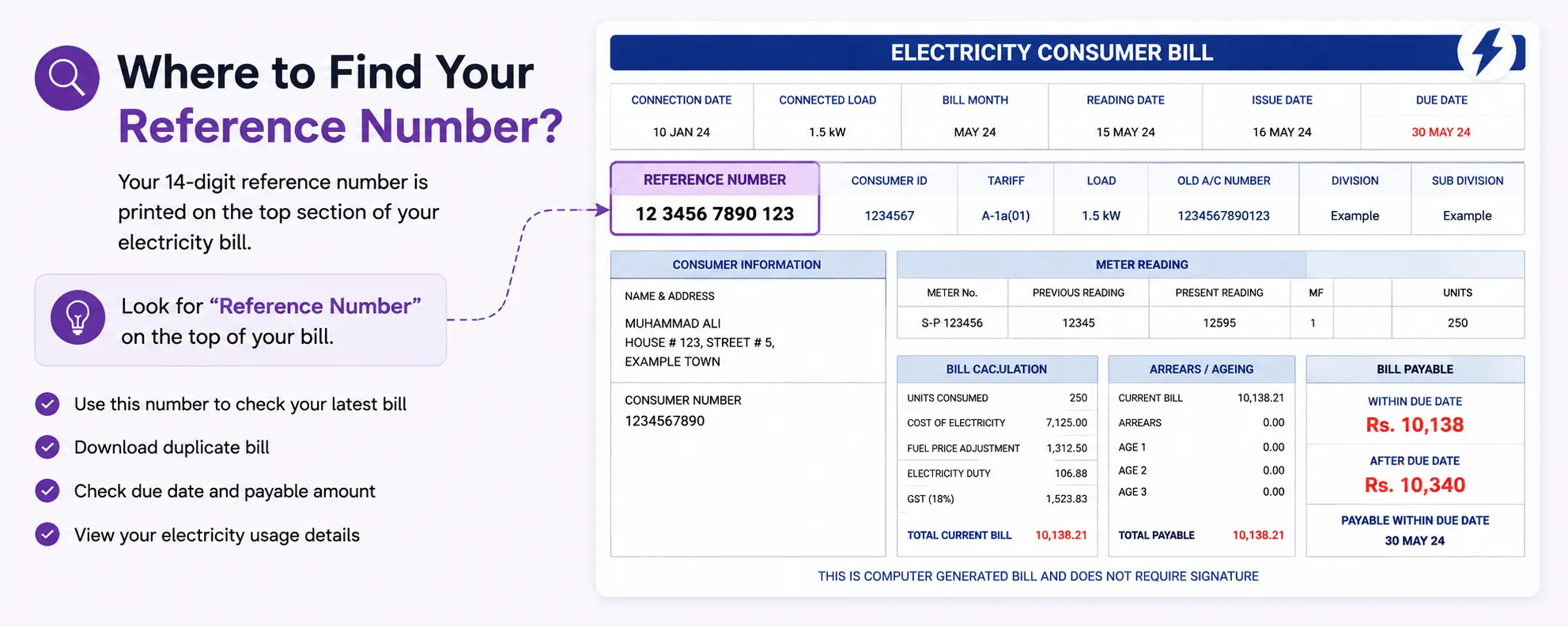
You can use this number to:
- View your latest bill
- Download duplicate bill copy
- Check due date and payable amount
- Access your bill details online
Important: Enter the reference number carefully without spaces or missing digits.
TESCO Duplicate Bill Download
Sometimes your original bill gets lost or delayed. In that case, you can simply generate a TESCO duplicate bill online.
Here’s what usually happens:
- Bill is generated monthly by DISCO system
- Data is stored in NEPRA-regulated database
- You can re-access it anytime using reference number
Honestly, this is one of the most useful features because many users in remote areas don’t receive physical bills on time.
TESCO Bill Breakdown (What You Are Paying For)
Most people only look at the final amount, but the bill is actually made of different parts.
| Component | Explanation |
|---|---|
| Units Used | Electricity consumed in kWh |
| Unit Rate | Price per unit (as per NEPRA slab) |
| FPA | Fuel Price Adjustment |
| GST | Government tax on electricity |
| Fixed Charges | Monthly service charges |
| TV Fee | In some regions included in bill |
Tariffs can change depending on NEPRA updates, so always verify from official sources. HESCO Bill Payment Online
Paying bills online has become very common in Pakistan now.
Instead of standing in long queues, you can pay through:
- Mobile banking apps
- Easypaisa
- JazzCash
- Internet banking
- ATM machines
TESCO Bill Status – Is My Bill Paid?
A lot of users ask:
“How can I confirm whether my HESCO bill is paid or not?”
Here’s the thing.
Online payment status may not update instantly. Usually, it takes some time after payment processing.
Ways to Verify Bill Payment
- Check banking app history
- Verify SMS confirmation
- Recheck bill after some hours
- Contact TESCO helpline if needed
If your bill still shows unpaid after 24 hours, it’s better to keep proof of payment safe.
TESCO New Connection Process
Applying for a new electricity connection now involves documentation and verification.
Usually Required Documents
- CNIC copy
- Property ownership papers
- Neighbor bill copy
- Application form
Processing time may vary depending on area and workload.
Always verify requirements from official HESCO channels because procedures can change.
TESCO Bill by Month
Some users prefer checking older bills for:
- Expense tracking
- Tax records
- Rental documentation
- Business accounting
Keeping monthly bill records helps compare electricity usage patterns throughout the year.