FESCO Online Bill Check

Have you ever opened your drawer and realized your electricity bill is missing right before the due date? It happens a lot. Many people in Faisalabad and nearby areas search for a quick way to check their duplicate bill online without visiting a customer center.

That’s where the FESCO online bill system becomes useful. You can view, download, or print your electricity bill within seconds using your 14-digit reference number. No long lines. No waiting.

I’ve noticed many users also get confused about taxes, meter charges, and online payment methods. So this guide covers everything in one place in simple language.

FESCO Online Bill Check 2026

Check your FESCO electricity bill online. This website helps users quickly access their electricity bills online. When you enter your reference number, you are securely redirected to the official billing source. We do not store your bill information.

0/14

Find your reference number on your electricity bill or meter

FESCO Bill Calculator

Enter your consumed units to estimate your FESCO electricity bill based on NEPRA 2025 tariff rates.

Where to Find Your Reference Number?

Your 14-digit reference number is usually printed at the top section of your electricity bill, as highlighted in the image below.

Look for the area labeled “Reference Number” and enter the digits exactly as shown on your bill to check your latest electricity bill online.
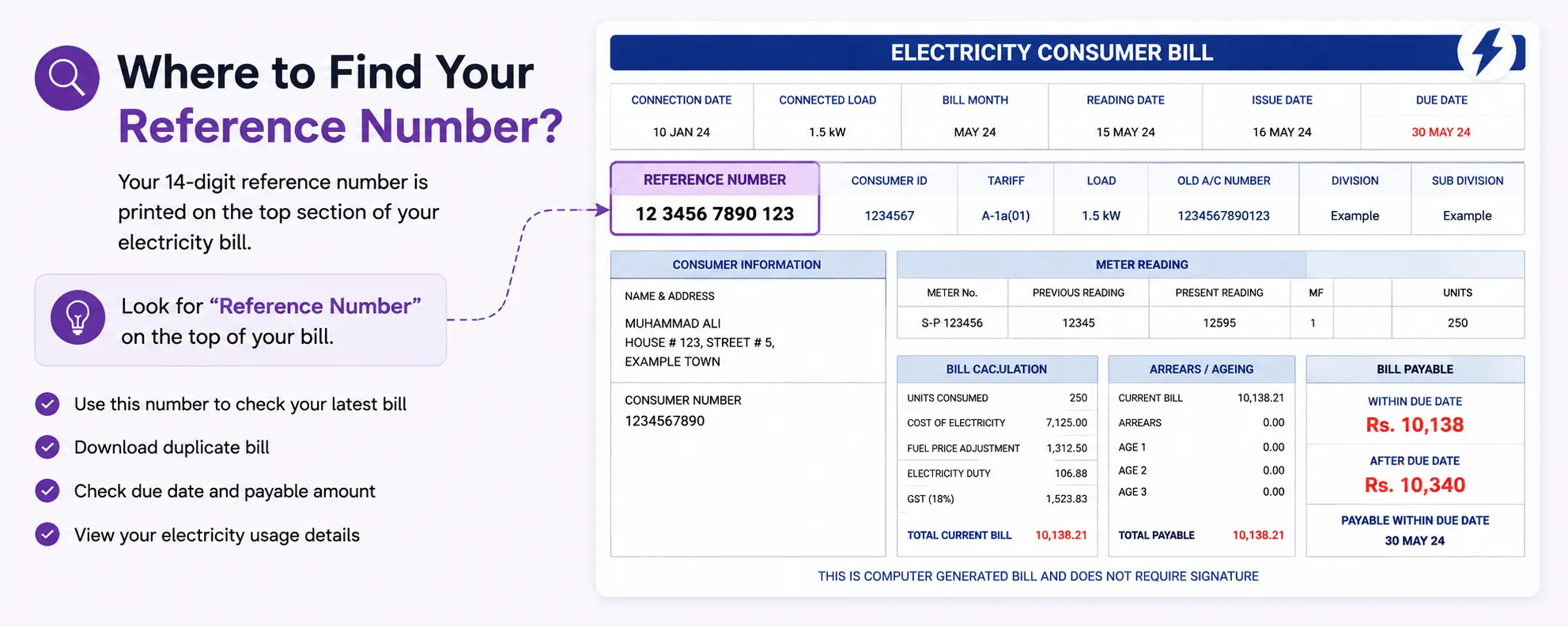
Where to Find Reference Number

You can use this number to:

  • View your latest bill
  • Download duplicate bill copy
  • Check due date and payable amount
  • Access your bill details online

Important: Enter the reference number carefully without spaces or missing digits.

Electricity Tariff Guide in Pakistan

Electricity Tariff Guide in Pakistan

Understanding your electricity bill in Pakistan is essential for managing household expenses. Electricity bills are calculated based on unit consumption and tariff slabs set by the National Electric Power Regulatory Authority (NEPRA). The electricity unit price in Pakistan varies depending on consumption levels, with different rates for residential, commercial, and industrial users. These Pakistan electricity tariffs may be updated periodically based on fuel costs and government policies.

Residential Electricity Tariff Slabs

Units Consumed Category Approx Unit Price (PKR)
0-100 units Protected 10.50
101-200 units Protected 13.50
201-300 units Non-Protected 34.00
301-400 units Non-Protected 39.00
Above 400 units Non-Protected 42.00

Note: Actual electricity unit prices in Pakistan may vary by distribution company and are subject to government updates. Check with your local DISCO for current rates.

Additional Charges in Electricity Bills

Fuel Price Adjustment (FPA)

An additional charge to cover fluctuations in fuel costs used for electricity generation. This is calculated per unit consumed.

Taxes and Duties

Includes General Sales Tax (GST) at 18% on the total bill amount and electricity duty at 1.5% on energy charges.

TV Fee

A fixed monthly fee of PKR 35 for Pakistan Television (PTV) license, added to all electricity bills regardless of TV ownership.

Meter Rent

A monthly charge for meter maintenance and reading services, typically ranging from PKR 50-200 depending on meter type.

GST (18%)

General Sales Tax applied to the subtotal including energy charges, adjustments, and other fees before final taxes.

Electricity Duty

A government levy of 1.5% on energy charges to support various development programs and infrastructure.

Example Bill Calculation (250 Units)

Step 1: Units Consumed250 units consumed in a month
Step 2: Apply Tariff Slab100 units x PKR 10.50 + 100 units x PKR 13.50 + 50 units x PKR 34.00 = PKR 3,950 energy charges
Step 3: Add Additional ChargesFPA: 250 x PKR 2.35 = PKR 587.50, QTA: 250 x PKR 0.55 = PKR 137.50, GST: 18%, TV Fee: PKR 35
Step 4: Estimated Final BillTotal estimated bill: Approximately PKR 5,500 (including all charges and taxes)

Electricity Saving Tips

1
Use Energy-Efficient Appliances

Switch to appliances with high energy star ratings and efficient motors to reduce electricity consumption.

2
Turn Off Unused Devices

Unplug electronics and appliances when not in use to avoid standby power consumption, also known as vampire power.

3
Switch to LED Bulbs

Replace incandescent bulbs with LED lights which use 75% less energy and last much longer.

4
Limit Air Conditioner Usage

Set AC temperature to 24C, use ceiling fans, and maintain proper insulation to reduce cooling costs.

5
Consider Solar Energy

Install solar panels or use solar-powered devices where possible to generate your own clean electricity.

What is FESCO?

Faisalabad Electric Supply Company, commonly known as FESCO, is one of Pakistan’s major electricity distribution companies operating under the supervision of WAPDA and regulated by NEPRA.

FESCO supplies electricity to millions of consumers across central Punjab.

FESCO Online Bill Check in 2026

You can perform an online FESCO bill check using your reference number. The process is simple on both mobile and desktop devices.

Steps to Check Your FESCO Bill Online

StepWhat You Need to Do
1Open the bill checking page
2Enter your 14-digit reference number
3Click the “Check Bill” button
4View your latest electricity bill
5Download or print the duplicate bill

Many users search using phrases like:

  • fesco online bill
  • fesco bill check
  • online fesco bill check
  • electricity bill fesco
  • www fesco com pk bill check online
  • fesco bill online check faisalabad

All these searches usually mean the same thing: checking a duplicate FESCO electricity bill online.

Easiest Ways to Pay Your FESCO Bill Online in 2026

Paying bills has become much easier compared to previous years. You no longer need to stand in long bank queues.

Here are the most common payment methods Pakistanis use in 2026.

JazzCash Mobile App

JazzCash allows users to pay their FESCO online bill using:

  • registered mobile number
  • CNIC-linked wallet
  • 14-digit reference number

How to Pay

  1. Open JazzCash app
  2. Tap “Bills & Utilities”
  3. Select Electricity
  4. Choose FESCO
  5. Enter reference number
  6. Confirm payment

Payment confirmation usually arrives instantly.

Easypaisa

Easypaisa remains one of the easiest payment options in Pakistan.

You can pay through:

  • Easypaisa app
  • USSD code
  • Retail shop/franchise agents

This is especially helpful for users who don’t use banking apps regularly.

Internet Banking

Most Pakistani banks support electricity bill payments through online banking portals.

Popular Banks Supporting FESCO Bill Payment

BankOnline Bill Support
HBLYes
MCBYes
UBLYes
Meezan BankYes

Simply open the bill payment section inside your banking app and enter your reference number.

1-Link ATM

Nearly all major ATMs connected with the 1LINK network allow utility bill payments.

ATM Payment Process

  • Insert ATM card
  • Open Bill Payment section
  • Select FESCO
  • Enter reference number
  • Confirm payment

Keep the printed receipt for record purposes.

Pakistan Post Offices

Pakistan Post still accepts electricity bill payments in cash.

This method is useful for:

  • senior citizens
  • rural consumers
  • users without banking apps

Bank Branches

Traditional counter payments are still available.

Take your printed bill copy to any participating bank branch and pay over the counter.

Areas Covered by FESCO

FESCO mainly provides electricity distribution services across central Punjab.

Major Coverage Areas

City / AreaCovered by FESCO
FaisalabadYes
JhangYes
Toba Tek SinghYes
ChiniotYes
SargodhaYes
KhushabYes
MianwaliYes
BhakkarYes

People from these regions commonly search for:

  • fesco bill online check faisalabad
  • electricity bill fesco
  • fesco online bill check

Apply for a New FESCO Connection Online

Need a new electricity meter connection?

You can now apply online instead of visiting offices repeatedly.

Basic Documents Usually Required

  • CNIC copy
  • Property ownership documents
  • Neighbor bill copy
  • Wiring test report

Applications are generally submitted through Pakistan’s electricity new connection portal.

Always verify requirements because procedures can change after policy updates.

Taxes in Your FESCO Bill

Many users get surprised when the final bill amount becomes much higher than expected.

That usually happens because of additional taxes and adjustments.

Common Charges You May See

ChargePurpose
GSTGovernment sales tax
FPAFuel Price Adjustment
TV FeeTelevision fee
QTR Tariff AdjQuarterly tariff adjustment
Meter RentMeter maintenance cost

Tariffs may vary depending on:

  • unit consumption
  • protected/non-protected category
  • NEPRA updates
  • seasonal fuel adjustments
FESCO Bill FAQs

FESCO Online Bill Check FAQs

Can I download a duplicate FESCO bill?

Yes. After checking your bill online, you can download or print it instantly.

Is online FESCO bill checking free?

Yes, bill checking services are free for consumers.

Can I pay my bill after the due date?

Yes, but late payment surcharge may apply depending on the delay.

Does FESCO provide SMS alerts?

In many cases, registered consumers receive bill notifications and updates through SMS services.

Do you store bill information?

No. We do not store your bill details or reference number.

Need help? Contact FESCO support or call 118 (WAPDA Helpline)