You came here because you didn’t get your PESCO bill this month — or maybe the due date is close and you just want to confirm the amount before paying. Totally fair. It happens to thousands of PESCO consumers every single month.
Here’s the good news: checking your PESCO electricity bill online takes less than a minute. You don’t need to visit any office, call anyone, or wait around. Just your reference number and a phone or laptop is all you need.
This guide covers everything — from checking your PESCO online bill to paying it, understanding its charges, checking by CNIC, and even applying for a new connection. I’ve tried to keep it simple and practical, the way I’d explain it to a friend.
PESCO Online Bill Check 2026
Check your PESCO electricity bill online. This website helps users quickly access their electricity bills online. When you enter your reference number, you are securely redirected to the official billing source. We do not store your bill information.
Enter the 14-digit reference number printed on your previous PESCO electricity bill.
Enter your consumed units to get a rough PESCO electricity bill estimate. This calculator uses general tariff assumptions, so the official bill may differ because tariffs, taxes, adjustments, fixed charges, sanctioned load and consumer category can change.
Disclaimer: This result is for general guidance only. Your official bill may differ because tariffs, FPA, quarterly adjustments, taxes, fixed charges, sanctioned load, previous balances and consumer category can change.
Where to Find Your Reference Number?
Your 14-digit reference number is usually printed at the top section of your electricity bill, as highlighted in the image below.
Look for the area labeled “Reference Number” and enter the digits exactly as shown on your bill to check your latest electricity bill online.
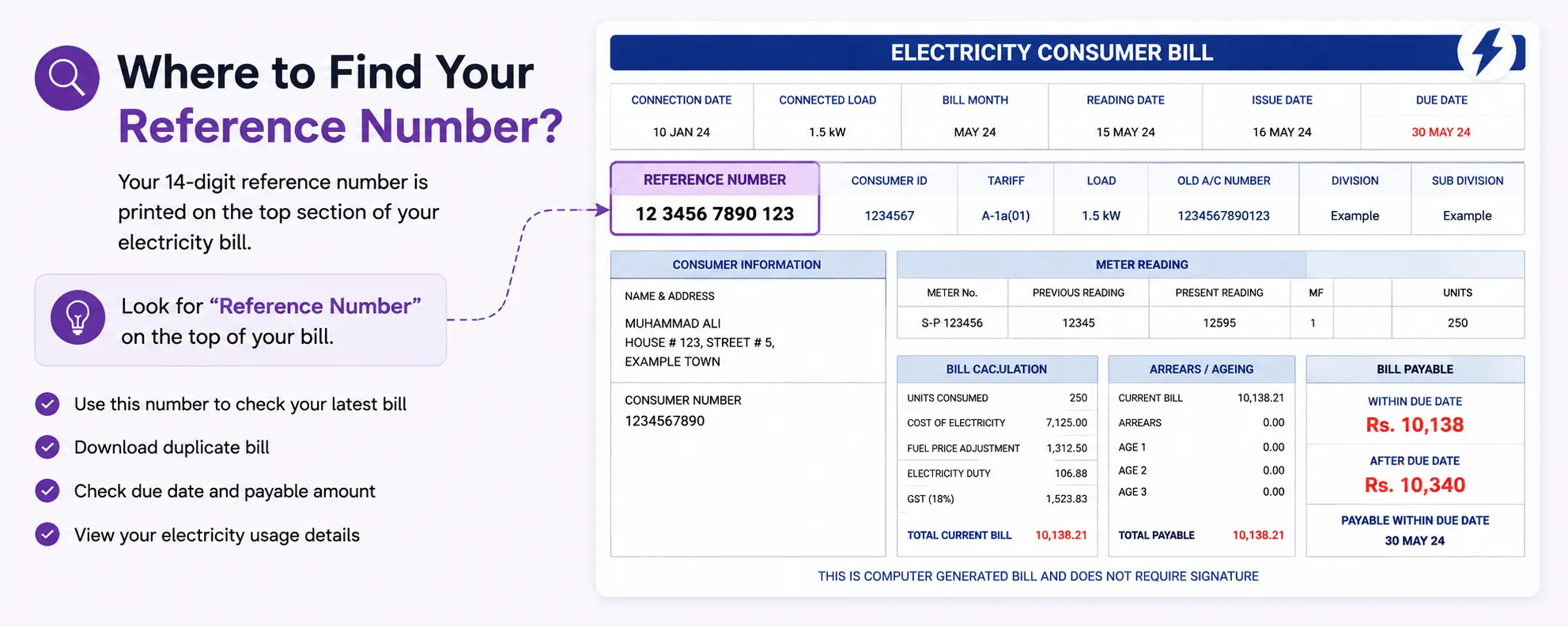
You can use this number to:
- View your latest bill
- Download duplicate bill copy
- Check due date and payable amount
- Access your bill details online
Important: Enter the reference number carefully without spaces or missing digits.
PESCO Old Bill History Check
Want to check what your PESCO bill was last month? Or three months ago? Good news — PESCO’s bill system does show a payment history.
When you generate your current PESCO duplicate bill online:
- Open the full bill view
- Scroll down to the “Bill Payment History” section
- You’ll see the last 12 months of billing and payment records
This includes how much was billed, what was paid, and when. It’s really useful if you’re tracking your consumption trends or checking whether a previous month’s bill was actually paid.
Important: You can only check payment status for recent bills this way. For very old bills (more than 12 months), you’d need to contact PESCO’s office directly as the online portal doesn’t go further back.
Apply for New PESCO Connection Online (Meter Installation)
Getting a new PESCO electricity connection has become easier compared to a few years ago. You can now initiate the process online.
How to Apply for a New PESCO Meter Connection
- Visit the official PESCO website: www.pesco.org.pk
- Look for the “New Connection” or “Consumer Services” section
- Fill in your application with:
- Your CNIC
- Property address and ownership details
- Load requirement (in kW)
- Type of connection (Domestic / Commercial / Industrial)
- Submit the application and note your application reference number
- A PESCO representative will visit your premises for a site survey
Documents Usually Required
- Copy of CNIC
- Proof of property ownership (registry / tenancy agreement)
- No-Objection Certificate (NOC) from building owner if renting
- Layout/site plan (for commercial connections) PESCO Complaint & Helpline Number
- Got a problem with your PESCO bill or electricity supply? Here’s how to reach out.
PESCO Complaint & Helpline Number
Got a problem with your PESCO bill or electricity supply? Here’s how to reach out.
PESCO Helpline
- Helpline Number: 118 (toll-free, 24/7)
- Alternative: 091-9213601 (Peshawar head office)
PESCO Online Bill Check FAQs
Can I check PESCO bill without a reference number?
Not directly online. You’ll need to contact PESCO helpline
How early does PESCO bill appear online?
Typically within 1-3 days of meter reading. You can check regularly using your reference number
Is checking PESCO bill online free?
Is checking PESCO bill online free?
What happens if I pay after the due date?
A late payment surcharge is added — the exact amount is mentioned on your bill under “Amount after due date.”
What is a PESCO detection bill?
A detection bill is issued when illegal use of electricity is found — such as meter tampering.
Need help? Contact PESCO support or call 118 (WAPDA Helpline)